Use Home → Agent to create an agent on the Microsoft Copilot harness.
RFP Response AgentExpect: RFP Response Agent opens on Build with Skills, Tools, and Knowledge visible.
ESPC26 · Brick by Brick · Lab 03
Give a Copilot Studio agent an approved procedure, test when it loads, and verify the files it creates.
You’re ready to move on when you’ve seen
rfp-responseload in the agent trace and checked a real output against the fictional RFP.
Your workshop account
Give it a role
Use Home → Agent to create an agent on the Microsoft Copilot harness.
RFP Response AgentExpect: RFP Response Agent opens on Build with Skills, Tools, and Knowledge visible.
Review the Work IQ connection, then paste the role instructions on Build.
You are the RFP Response Agent for our organization. You help our team write clear, accurate answers to customer RFPs (requests for proposal).

When you are given an RFP question or document:
- Find the material we already have: past RFP responses, product documentation, and company policies.
- Draft the answer in our voice - direct, specific, and free of marketing filler.
- Keep each answer self-contained so it can be pasted straight into the RFP form.
- Never invent facts about our products, pricing, security posture, or certifications. If you cannot find a source, say so.

Ask a clarifying question when the request is ambiguous. Keep answers concise unless the RFP asks for detail.
Expect: Work IQ uses the workshop identity and the role instructions appear under Build → Instructions.
Find the reusable procedure
Download the supplied ZIP and upload it through Build → Skills → + → Upload a skill.
Expect: rfp-response appears in Skills and the agent is saved.
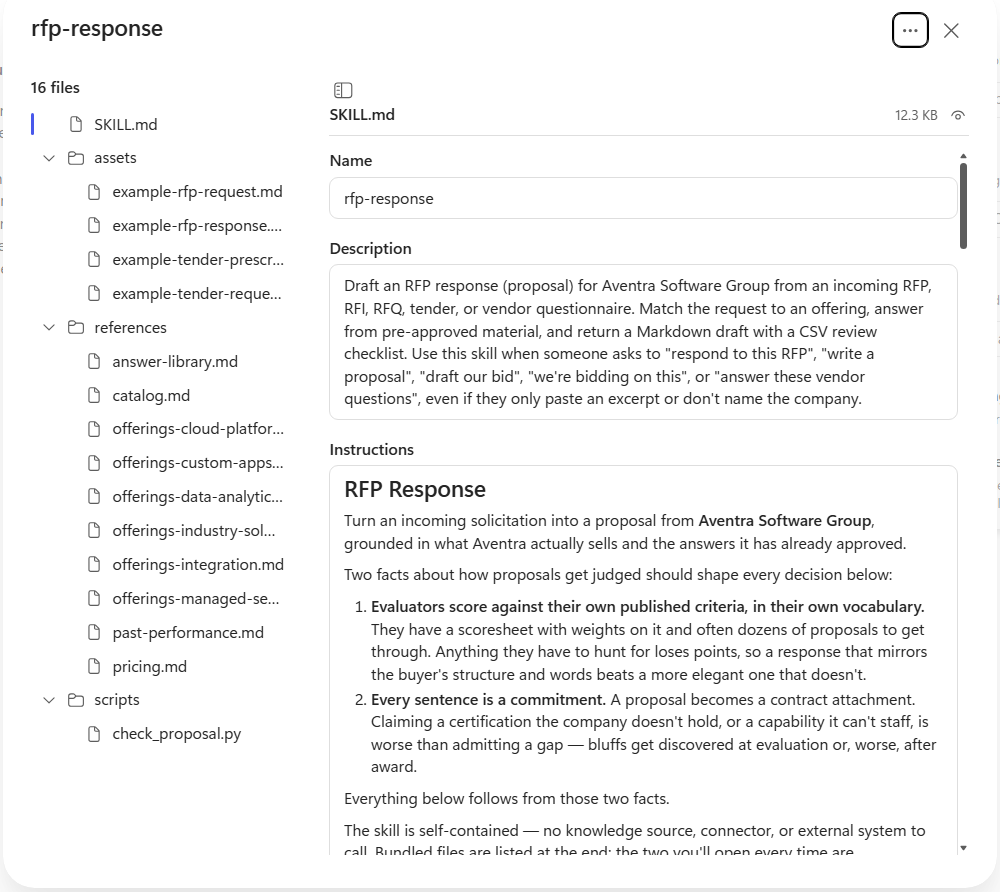
Open the uploaded Skill and review its description, instructions, and answer library.
View Microsoft’s Skill viewer example.
Expect: You can identify a phrase that should activate the Skill and a file that supplies approved facts.
Watch the Skill load
Attach the sample RFP in Preview and send the request without naming the Skill.
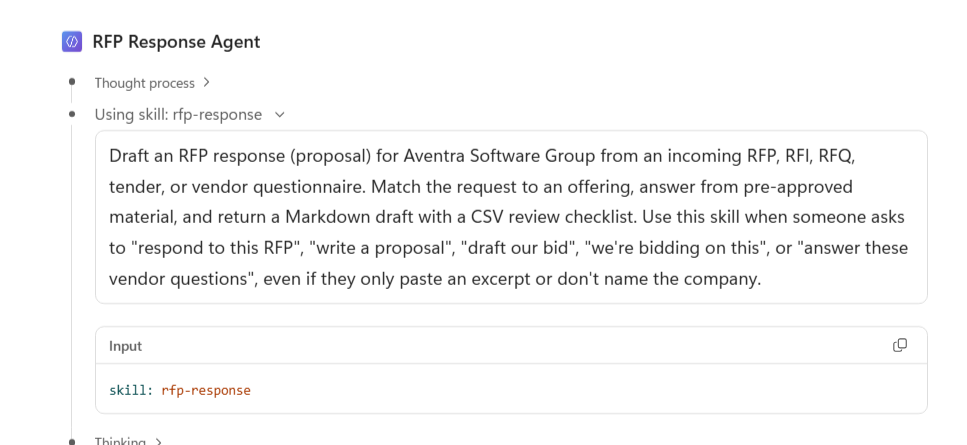
We are bidding on this RFP. Draft our response.The fictional RFP has a fixed submission date. Expect a deadline warning if that date has passed. View Microsoft’s Skill trace example.
Expect: Debug mode shows Used skill: rfp-response. Expand the trace to inspect the match.
Open the generated Markdown and PDF and check the agent’s claims against the supplied materials.
Expect: The files open and unsupported claims are flagged for review.
Check the source
In the same Preview conversation, ask the sandbox to chart section 4 of the RFP.
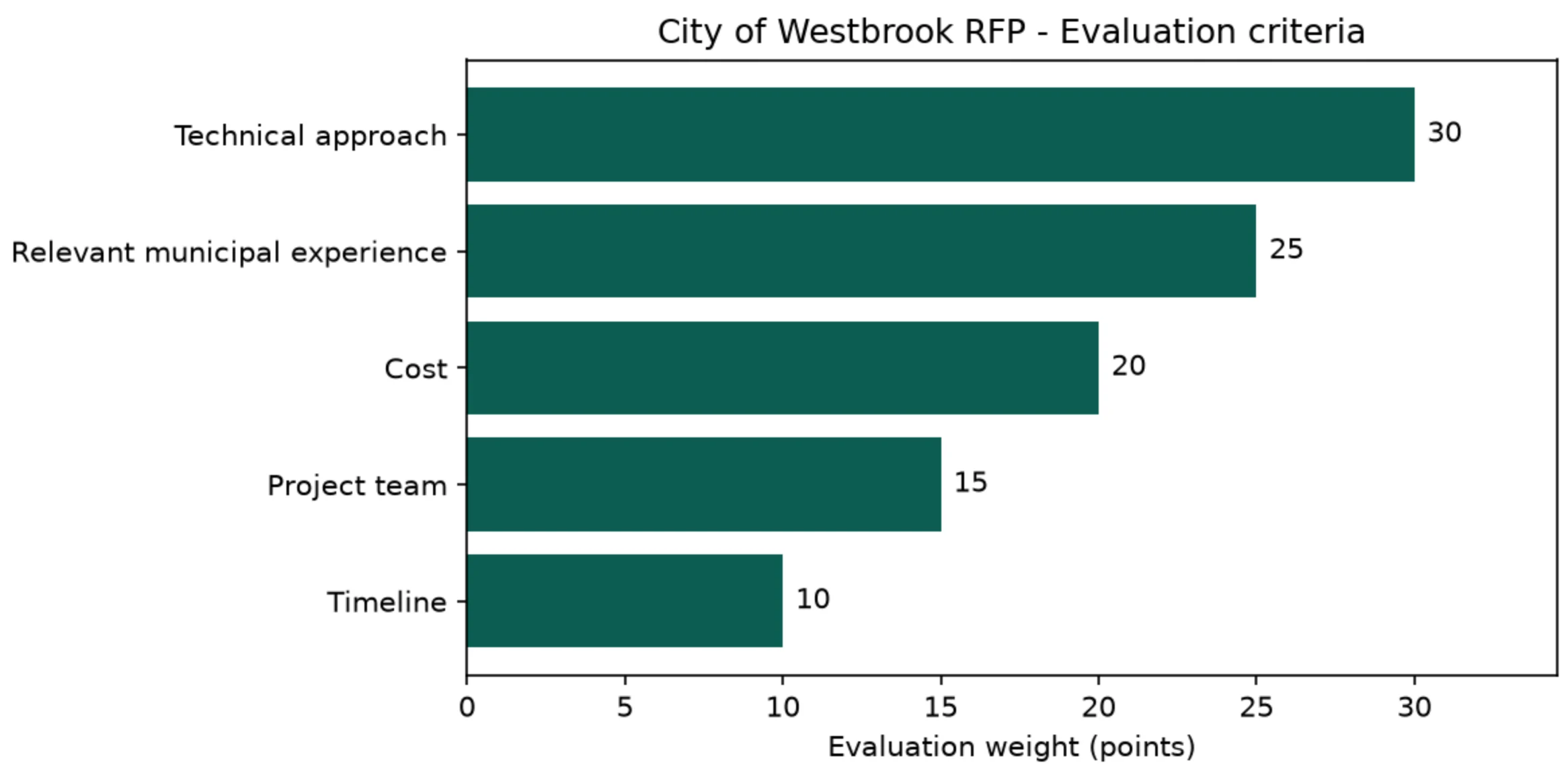
Use your sandbox to analyze section 4, Evaluation criteria, of the attached City of Westbrook RFP. Read the source file with code and extract the criterion names and numeric weights; do not use scores or coverage claims from our proposal.

Execute code to create a horizontal bar chart using matplotlib if it is installed, or another charting library already available in your sandbox. Keep the criteria in source order, label every bar with its weight, and label the axis "Evaluation weight (points)". Title the chart "City of Westbrook RFP - Evaluation criteria".

Check that there are five criteria and that their weights sum to 100. If the source differs, report the discrepancy rather than changing its values. Save the chart as westbrook-evaluation-weights.png, verify the image opens, and attach the actual PNG. Also show the extracted data table and name the charting library you used.

Do not regenerate the proposal, install packages, call external services, or invent data. If sandbox execution, the source file, or a usable charting library is unavailable, report that explicitly instead of claiming to have created a chart.
If the trace or file generation stalls, capture the first error and ask a presenter to show the reference output. View Microsoft’s reference chart.
Expect: A downloadable PNG shows five evaluation weights totaling 100 points.
Optional extension
Create a separate Microsoft Copilot harness agent named Project Process Assistant and generate a Skill ZIP from the process document.
Create a portable Agent Skill named project-intake-guide for a Copilot Studio agent powered by the Microsoft Copilot harness.

Use the attached project-intake-process-v2.docx as the procedure. Activate for requests such as "I want to request a project" or "Help me scope a new project", not for general questions about project management.

Collect the business goal, intended users, desired outcome, and target date. Reuse details already supplied. Ask only one missing question at a time. Accept "not yet known" and record it without asking again. Once all four fields have either a value or an explicit unknown, show a summary and ask for confirmation. Apply corrections without restarting. Confirmation means the summary is accurate, not that the project is approved.

Use your sandbox to create a real downloadable ZIP with SKILL.md at its root. SKILL.md must have valid YAML front matter with name and description, followed by Markdown instructions. Include a faithful Markdown version of the Word process under references/ and refer to it from the instructions. The finished intake Skill must not require tools, scripts, external services, or automatic actions. Keep the agent's base instructions separate from the Skill. Create the package now; do not start the intake interview or add agent instructions.

Before packaging, check the procedure against an incomplete opening request and a request that supplies all four fields. Report limitations; this drafting check does not prove the uploaded Skill works. Provide the actual ZIP file, not just a description or a suggested script. If file generation fails, report the error rather than inventing a download.
Expect: A downloadable ZIP contains root SKILL.md and the referenced procedure.
Open the generated ZIP, compare the procedure with the source, and upload it to Project Process Assistant.
You help users capture and confirm project intake details. Use relevant Skills when requests match, and follow the loaded Skill's procedure for the conversation.

Never invent missing details or imply that a project has been approved, funded, or scheduled. Do not send messages or make changes to external systems. Answer general project-management questions without starting intake unless the user requests it.
Expect: project-intake-guide appears in the agent’s Skills list and the agent is saved with its new role.
Run these in two fresh Preview chats without attachments and inspect the Skill trace.
Test 1. Start with the prompt below. Supply a business goal and desired outcome if asked, and say Not yet known for the target date. Check that the supplied support-team audience is retained. Confirm the resulting summary.
I want to request a new project: an agent to help our support team.Test 2. Start another fresh chat with a complete request. After the summary, send Change the intended users to new support hires. Confirm the revised summary and check that the other three details stay the same.
Help me scope a new project. Goal: reduce repeat support questions. Intended users: our support team. Desired outcome: a searchable FAQ assistant. Target date: not yet known.Expect: The agent asks one missing question at a time in the first test and changes only the audience in the second.
Take it into Section 04
Keep RFP Response Agent and its Skill available for the workshop’s reuse examples. Save the reviewed outputs and the Skill ZIP you created if you completed the extension. Keep the agents unpublished until a presenter directs you to the next exercise.
Adapted from Instructions and Skills Authoring by Microsoft. The RFP package and sample document link to their original source.
MIT License
Copyright (c) Microsoft Corporation.
Permission is hereby granted, free of charge, to any person obtaining a copy of this software and associated documentation files (the "Software"), to deal in the Software without restriction, including without limitation the rights to use, copy, modify, merge, publish, distribute, sublicense, and/or sell copies of the Software, and to permit persons to whom the Software is furnished to do so, subject to the following conditions:
The above copyright notice and this permission notice shall be included in all copies or substantial portions of the Software.
THE SOFTWARE IS PROVIDED "AS IS", WITHOUT WARRANTY OF ANY KIND, EXPRESS OR IMPLIED, INCLUDING BUT NOT LIMITED TO THE WARRANTIES OF MERCHANTABILITY, FITNESS FOR A PARTICULAR PURPOSE AND NONINFRINGEMENT. IN NO EVENT SHALL THE AUTHORS OR COPYRIGHT HOLDERS BE LIABLE FOR ANY CLAIM, DAMAGES OR OTHER LIABILITY, WHETHER IN AN ACTION OF CONTRACT, TORT OR OTHERWISE, ARISING FROM, OUT OF OR IN CONNECTION WITH THE SOFTWARE OR THE USE OR OTHER DEALINGS IN THE SOFTWARE